How I Capture 4K/60 HDR Gameplay on PS5 — My Full BOSS KG Setup
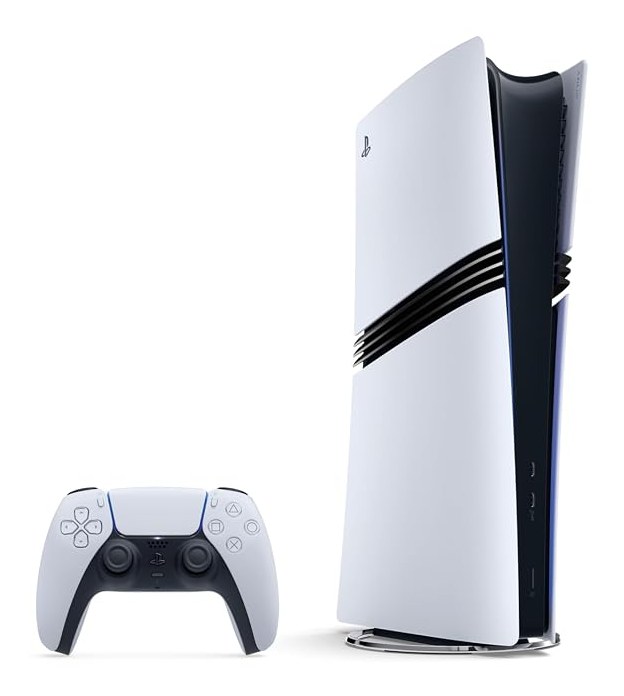
Every 4K/60 HDR playthrough on the channel runs through the same chain. People ask about it constantly, so here’s the whole thing — the exact gear, why each piece is in the setup, and how it fits together. If you’re trying to record or stream console gameplay that actually looks like the game (not a compressed, washed-out version of it), this is the blueprint I’d hand you.
The goal: a clean 4K/60 HDR signal, start to finish
The trap most people fall into is losing quality somewhere in the chain — a capture card that drops HDR, a cable that can’t carry the bandwidth, or an encode that crushes the detail. My whole setup is built around one rule: keep the signal 4K, 60fps, and HDR from the console all the way to the recording, and only compress it once, at the very end, on my terms.
The console — PlayStation 5 Pro
Everything starts on the PS5 Pro. The extra GPU headroom and PSSR upscaling mean more games hold a genuine 4K/60 target instead of dropping to a blurry performance mode, which matters a lot when you’re capturing — you’re recording the best version of each game, not a compromise. It’s the main rig, and it’s on for hours at a time, so the storage and thermals below matter just as much as the raw power.
Capture — Elgato 4K Pro (internal) + 4K X (external)
This is the heart of it. My primary capture is the Elgato 4K Pro, an internal PCIe card. Going internal means no USB bandwidth bottleneck and no extra latency — the PS5 signal comes in, passes through to my display with 8K60 passthrough headroom, and records 4K60 HDR10 cleanly in the background. Because it’s on the PCIe bus, it stays rock-solid over long sessions.
I keep an Elgato 4K X in the setup too as the external option — HDMI 2.1, 4K144, ultra-low latency — for when I need to capture off a second machine or move the rig. Between the two I can capture basically anything without dropping HDR.
The one requirement to know: an internal card needs a desktop with a free PCIe slot. If you’re on a laptop, the 4K X (external) is the one to get.
Display — LG C5 65” OLED evo
I play and monitor on the LG C5 OLED. Two reasons. First, OLED with proper Dolby Vision/HDR is how these games are meant to look — the black levels and highlight punch are the whole point of capturing HDR in the first place. Second, 4K/120Hz with low input lag means what I’m reacting to on screen matches what the capture sees. If your monitor can’t show real HDR, you’re flying blind on whether your capture looks right.
Control — DualSense Edge
The everyday pad is the DualSense Edge. Back paddles and remappable inputs keep my thumbs on the sticks during the moments that actually make the clip, and the tunable triggers/sticks let me dial each game in. On hard-difficulty runs where one input costs you the fight, the paddles genuinely earn their place. (Full review here.)
Audio — SteelSeries Arctis Nova 7P
For monitoring and comms I run the SteelSeries Arctis Nova 7P — wireless with a 2.4GHz dongle plus Bluetooth, so I can hear game audio and stay connected without a cable snagging mid-session. Clean game audio in my ears means I catch the cues that drive commentary and reactions.
Storage — WD_BLACK SN850P 4TB
4K games are enormous, and I keep a big library installed so I can jump between playthroughs. The WD_BLACK SN850P (officially licensed PS5 expansion, up to 7,300MB/s, with a heatsink) means no juggling installs and no thermal throttling on long sessions. Boring, but it’s the difference between “ready to record” and “waiting on a 120GB reinstall.”
Facecam — Elgato Cam Link 4K
When I want a real camera feed instead of a webcam, the Elgato Cam Link 4K turns a proper camera into a clean facecam input. It’s optional to the capture chain, but it’s what takes an overlay from “streamer webcam” to something that looks intentional.
How it ties together
Console → internal capture (with passthrough to the OLED so I’m playing on a real HDR panel) → recorded clean at 4K60 HDR → encoded once, at the end, for each platform. Controller, audio, storage and camera are the support layer that keeps a multi-hour session stable. Nothing here is exotic — the trick is just refusing to lose quality at any single step.
Every product above is what I actually run, and you can find the exact models on my gear page (some links are affiliate — they support the channel at no extra cost to you). If you’re building toward clean 4K/60 HDR capture, start with the console and the capture card; everything else is what makes it comfortable to do for hours.
Got a setup question I didn’t cover? Ask — I read everything.
Never miss the next big drop
Get our best gaming & Marvel stories in your inbox. No spam, unsubscribe anytime.
🎉 You're in! Check your inbox for a welcome email.